Summary
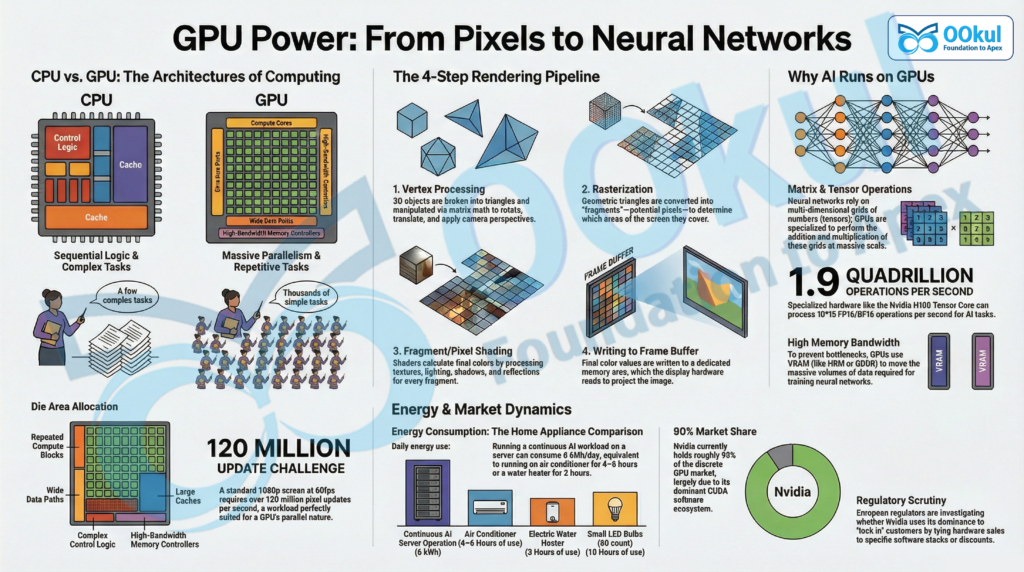
- GPUs (Graphics Processing Units) are specialised processors designed to perform many simple calculations in parallel, making them ideal for graphics and AI workloads.
- CPUs vs GPUs: CPUs excel at a few complex, branching tasks; GPUs excel at huge numbers of similar, repetitive tasks.
- Rendering pipeline has four key stages: vertex processing, rasterisation, fragment/pixel shading, and writing to the frame buffer.
- Matrix and tensor operations are the core maths behind neural networks, and GPUs (and TPUs) are optimised to perform them extremely fast.
- A die is the actual piece of silicon containing the processor circuitry; GPUs and CPUs are dies packaged on boards or within system-on-chip designs.
- Energy use: powerful GPUs can draw a few hundred watts each; continuous AI workloads can consume energy comparable to home appliances like ACs or water heaters.
- Nvidia and regulation: Nvidia doesn’t have a legal monopoly on GPUs but has dominant market power, especially in AI. European regulators are probing whether it uses this dominance to unfairly lock in customers.
What Is a GPU?
- Basic idea
- A Graphics Processing Unit (GPU) is a highly parallel number-cruncher.
- It is designed to execute the same type of operation on many data items at once.
- Analogy
- Imagine checking exam papers for an entire school:
- One teacher working alone (like a CPU) can do it, but it takes days.
- Hundreds of teachers working in parallel (like GPU cores) can finish in an hour.
- Each GPU core is simpler than a CPU core, but the sheer number of cores allows massive parallelism.
GPU vs CPU: Key Differences
- CPU (Central Processing Unit)
- Optimised for:
- A smaller number of complex, branching tasks.
- Quickly switching between many different types of tasks.
- Die area is heavily used for:
- Complex control logic.
- Large caches (fast on-chip memory).
- Features that improve single‑threaded performance and decision-making speed.
- Optimised for:
- GPU
- Optimised for:
- Huge numbers of similar, repetitive operations.
- Data-parallel tasks such as graphics rendering, machine learning, simulations, and image processing.
- Die area is heavily used for:
- Many repeated compute blocks (thousands of simpler cores).
- Very wide data paths.
- High-bandwidth memory controllers and on-chip networks.
- Often has more total transistors than a CPU and can be physically very large.
- Optimised for:
- Workload example: drawing a frame on screen
- A 1920×1080 display has about 2.07 million pixels per frame.
- At 60 frames per second, that’s over 120 million pixel updates per second.
- Each pixel’s colour depends on:
- Lighting, shadows, textures, material properties, reflections, etc.
- This is ideal for GPUs because the same steps are applied to many pixels in parallel.
The Four Steps in the Rendering Pipeline
- 1. Vertex Processing
- Input: 3D objects broken into triangles; each triangle has vertices (corner points).
- Work done:
- Use matrix maths to:
- Rotate objects.
- Move (translate) them in 3D space.
- Apply camera perspective (how 3D appears on a 2D screen).
- Output: positions of triangle vertices as they should appear on the screen.
- 2. Rasterisation
- Input: triangle positions on the screen.
- Work done:
- Decide which pixels each triangle covers.
- Convert geometric triangles into pixel-sized fragments.
- Output: a set of fragments that are candidates to become pixels.
- 3. Fragment / Pixel Shading
- Input: fragments (potential pixels) with basic info.
- Work done for each fragment:
- Look up textures (images mapped onto surfaces).
- Compute lighting (angle and intensity of light sources).
- Apply shadows and reflections.
- Combine all effects to determine the final colour and transparency.
- Output: final colour values for each pixel position.
- 4. Writing to the Frame Buffer
- Input: final pixel colours.
- Work done:
- Write colours into a special memory area called the frame buffer.
- The display hardware reads this buffer and shows the image on screen.
- Output: a complete image frame ready for display.
- Shaders
- These steps are executed by small programs called shaders.
- The GPU runs the same shader code across many vertices or fragments in parallel.
Memory: VRAM, Caches, and Bandwidth
- VRAM (Video RAM)
- Dedicated memory on the graphics card.
- Stores:
- 3D models.
- Textures.
- Intermediate data.
- Final frame buffer.
- Designed for high bandwidth – moving large volumes of data per second.
- Caches and shared memory
- Smaller, faster memories inside the GPU.
- Reduce the need to repeatedly fetch the same data from VRAM.
- Help prevent memory access from becoming a performance bottleneck.
- Why this matters
- Many non-graphics tasks (e.g., machine learning, simulations) also involve applying the same operation to huge arrays of numbers.
- GPUs’ combination of parallel cores and high memory bandwidth makes them ideal for such workloads.
What Is a Die and Where Is the GPU Located?
- Die
- A die is the flat piece of silicon that actually contains the transistors and circuits of the chip.
- Measured in square millimetres (mm²).
- Both CPUs and GPUs are silicon dies made with similar fabrication technologies (e.g., 3–5 nm nodes).
- Discrete graphics card
- The GPU die sits under a heat sink (and often a fan or liquid cooling) on a graphics card.
- Surrounded by VRAM chips on the same printed circuit board (PCB).
- The entire card plugs into the motherboard via a high-speed connector (e.g., PCIe).
- Integrated graphics
- In many laptops and smartphones, the GPU and CPU are on the same die or in the same package.
- Such designs are called systems-on-a-chip (SoCs).
- They integrate CPU cores, GPU cores, memory controllers, and other components in one compact unit.
Are GPUs Smaller Than CPUs?
- Not inherently smaller
- GPUs are not smaller because of different physics or transistor types.
- Both use similar silicon transistor technologies.
- Architectural differences
- CPUs:
- More die area for control logic and caches.
- Optimised for general-purpose, low-latency, branching code.
- GPUs:
- More die area for repeated compute blocks (many cores).
- Very wide data paths and large register files.
- Extra hardware for high-bandwidth memory connections, display controllers, on-chip networks, etc.
- CPUs:
- Transistor counts and size
- High-end GPUs often have more total transistors than many CPUs.
- They are not necessarily more densely packed per mm².
- Some GPU packages place dynamic RAM (e.g., HBM) very close to the GPU die via short, high-bandwidth connections.
Matrix and Tensor Operations
- Matrix operations
- A matrix is a 2D grid of numbers (rows and columns).
- Matrix multiplication combines two matrices (say A and B) into a third (C).
- Example: an element c12 in C depends on a combination like a11b12 + a12b22 (and so on, depending on the full size of the matrices).
- Matrix operations are central to many algorithms in graphics and machine learning.
- Tensor operations
- A tensor generalises matrices to higher dimensions:
- 1D: vector.
- 2D: matrix.
- 3D or more: higher-order tensor (e.g., width × height × colour channels of an image).
- Tensor operations are the same basic maths (adds, multiplies) extended to more dimensions.
- Neural networks repeatedly perform these operations on large tensors.
- A tensor generalises matrices to higher dimensions:
Why Do Neural Networks Use GPUs?
- 1. Massive parallelism
- Neural networks consist of layers with many parameters (weights and biases):
- Modern models can have millions to billions of parameters.
- Core computation: repeated matrix and tensor multiplications.
- Same operations (multiplication, addition) applied across large arrays of numbers.
- GPUs, with thousands of cores, execute these parallel operations very efficiently.
- Neural networks consist of layers with many parameters (weights and biases):
- 2. High memory bandwidth
- Training and running neural networks require moving large volumes of data quickly.
- GPUs are built with very high-bandwidth memory systems (e.g., HBM, GDDR VRAM).
- This allows them to feed data to compute units fast enough to keep them busy.
- 3. Specialised tensor hardware
- Many modern GPUs include tensor cores – units specialised for matrix and tensor operations.
- Example: NVIDIA H100 Tensor Core GPU can perform around 1.9 quadrillion (1015) FP16/BF16 tensor operations per second.
- Google’s Tensor Processing Units (TPUs) are custom chips built specifically for neural network maths.
How Much Energy Do GPUs Need?
- Example scenario
- Task: train a neural network to predict disease risk based on medical data.
- Hardware:
- 4× Nvidia A100 PCIe GPUs, each with board power around 250 W during training.
- Training duration: 12 hours.
- Energy during training
- Assume GPUs are nearly fully used.
- GPU power during training: 4 × 250 W = 1000 W (1 kW).
- Energy = power × time ≈ 1 kW × 12 h = 12 kWh.
- Energy during inference (use in production)
- Assume only 1 GPU is used for inference, and utilisation is lower.
- Approximate energy for inference: around 2 kWh over a day (as per the example).
- Other system components
- Servers also consume power for:
- CPUs
- RAM
- Storage
- Cooling fans
- Networking and power conversion losses
- Typical rule of thumb: add 30–60% of GPU power for these overheads.
- In the example, total energy for continuous operation is about 6 kWh/day.
- Servers also consume power for:
- Household comparison
- 6 kWh/day is roughly equivalent to:
- Running an air-conditioner for 4–6 hours at full compressor power.
- Running a water heater for about 3 hours.
- Running about 60 small LED bulbs for 10 hours per day.
Does Nvidia Have a Monopoly?
- Market position
- Nvidia does not have a legal monopoly on GPUs in the strict sense.
- However, it has near-complete dominance in some segments, especially AI computing platforms.
- Discrete GPUs for personal computers
- Industry trackers report Nvidia holds roughly 90% market share in discrete GPUs.
- The remaining share is mostly held by AMD and Intel.
- Data centre and AI GPUs
- Nvidia’s strength here comes from:
- Hardware performance and availability.
- The CUDA software ecosystem.
- CUDA is Nvidia’s platform for running general-purpose computation on its GPUs.
- Many AI frameworks and tools are deeply optimised for CUDA.
- Switching away from Nvidia often means rewriting or adapting software, which buyers are reluctant to do.
- As a result, Nvidia GPUs + CUDA are widely treated as the default platform for large-scale neural network training and inference.
- Nvidia’s strength here comes from:
Why Are European Regulators Investigating Nvidia?
- Legal notion of monopoly
- In competition law, a monopoly is less about having 100% share and more about:
- Whether a firm can control prices or exclude competitors.
- Whether it maintains that power through unlawful conduct.
- Concerns about Nvidia
- European regulators are examining whether Nvidia uses its dominance to lock in customers.
- Key issues being probed include:
- Tying GPU sales to Nvidia software or related components.
- Providing discounts that depend on buyers also adopting Nvidia software stacks.
- Practices that could make it harder for rivals to compete on equal terms.
- The concern is that such behaviour could entrench Nvidia’s market power in AI and data-centre computing.
Key Takeaways
- GPUs are specialised for parallel, repetitive computation, originally for graphics but now central to AI.
- The rendering pipeline consists of vertex processing, rasterisation, fragment/pixel shading, and writing to the frame buffer.
- A die is the silicon piece that holds CPU or GPU circuits; GPUs can be discrete or integrated on the same die as CPUs.
- Matrix and tensor operations underpin neural networks, and GPUs (and TPUs) are optimised to execute them at massive scale.
- High-end GPUs consume significant power; continuous AI workloads can use energy comparable to major household appliances.
- Nvidia dominates key GPU markets, especially AI, and regulators are assessing whether it is leveraging this dominance in anti-competitive ways.
- Open Practice
Source: The Hindu